時間、タイムゾーン
English
Français
Deutsch
Español
日本語
繁體
简体
Português
Italiano
Русский
ワールドタイム,時刻,タイムゾーン,世界のタイムゾーン,時計
Area
北米
アンギラ
アンティグアバーブーダ
バハマ
バルバドス
ベリーズ
バミューダ
英領ヴァージン諸島
カナダ
ケイマン諸島
コスタリカ
キューバ
キュラソー
ドミニカ国
ドミニカ共和国
エルサルバドル
グレナダ
グアドループ
グアム
グアテマラ
ホンジュラス
ジャマイカ
メキシコ
モントセラト
ニカラグア
北マリアナ諸島
パナマ
プエルトリコ
セントクリストファーネイビス
セントルシア
サンピエール島ミクロン島
セントビンセントおよびグレナディーン諸島
タークスカイコス諸島
アメリカ
アメリカ領ヴァージン諸島
南アメリカ
アルゼンチン
アルバ
ボリビア
ブラジル
リオデジャネイロ
リオグランデドノルテ
エクアドル
フォークランド諸島
フランス領ギアナ
ガイアナ
パラグアイ
ペルー
ウルグアイ
VenezuPela
ベネズエラ
ヨーロッパ
アルバニア
アンドラ
アルメニア
オーストリア
ベラルーシ
ベルギー
ボスニアヘルツェゴビナ
ブルガリア
クロアチア
キプロス
チェコ共和国
デンマーク
エストニア
フェロー諸島
フィンランド
フランス
ドイツ
ジブラルタル
ギリシャ
ハンガリー
アイスランド
アイルランド
イタリア
コソボ
ラトビア
リヒテンシュタイン
リトアニア
ルクセンブルク
共和国マケドニアの
マルタ
モルドバ
モナコ
モンテネグロ
オランダ
ノルウェー
ポーランド
ポルトガル
ルーマニア
ロシア
サンマリノ
セルビア
スロバキア
スロベニア
スペイン
スウェーデン
スイス
トルコ
イギリス
ウクライナ
バチカン市国国務
オーストラリア太平洋
米領サモア
オーストラリア
ココス諸島
クック諸島
フィジー
フランス領ポリネシア
キリバス
マーシャル諸島
ミクロネシア
ナウル
ニュージーランド
ニウエ
ノーフォーク島
パラオ
パプアニューギニア
ピトケアン諸島
ソロモン諸島
トンガ
ツバル
バヌアツ
ウォリスフツナ
アジア
アフガニスタン
アゼルバイジャン
バーレーン
バングラデシュ
ブータン
ブルネイ
カンボジア
中国
ガザ地区
ジョージア
香港
インド
インドネシア
イラン
イラク
イスラエル
日本
ヨルダン
カザフスタン
クウェート
キルギスタン
ラオス
レバノン
マカオ
マレーシア
モンゴル
ミャンマー
ネパール
北朝鮮
オマーン
パキスタン
フィリピン
カタール
サウジアラビア
シンガポール
大韓民国
スリランカ
シリア
台湾
タジキスタン
タイ
東ティモール
トルクメニスタン
アラブ首長国連邦
ウズベキスタン
ベトナム
ヨルダン川西岸地区
イエメン
アフリカ
アルジェリア
アンゴラ
ベナン
ボツワナ
ブルキナファソ
ブルンジ
カメルーン
カーボベルデ
中央アフリカ共和国
チャド
コモロ
コンゴ
コンゴ民主共和国
コートdIvoireコートジボワール
ジブチ
エジプト
赤道ギニア
エリトリア
エチオピア
ガボン
ガンビア
ガーナ
ケニア
レソト
リベリア
リビア
マダガスカル
マラウイ
マリ
モーリタニア
モーリシャス
マヨット島
モロッコ
モザンビーク
ナミビア
ニジェール
ナイジェリア
レユニオンフランス語
ルワンダ
セントヘレナ
サントメプリンシペ
セネガル
セーシェル
シエラレオネ
ソマリア
南アフリカ
スーダン
スワジランド
タンザニア
トーゴ
チュニジア
ウガンダ
西サハラ
ザンビア
ジンバブエ
チューリッヒ - Zurich ワールドタイム,時刻,タイムゾーン,世界のタイムゾーン,時計
標準的なタイムゾーン:
UTC/GMT+1
夏時間の開始:
1 時
現在のタイムゾーン:
UTC/GMT2
タイムゾーン:
CEST
インストールタイムゾーンのツール!
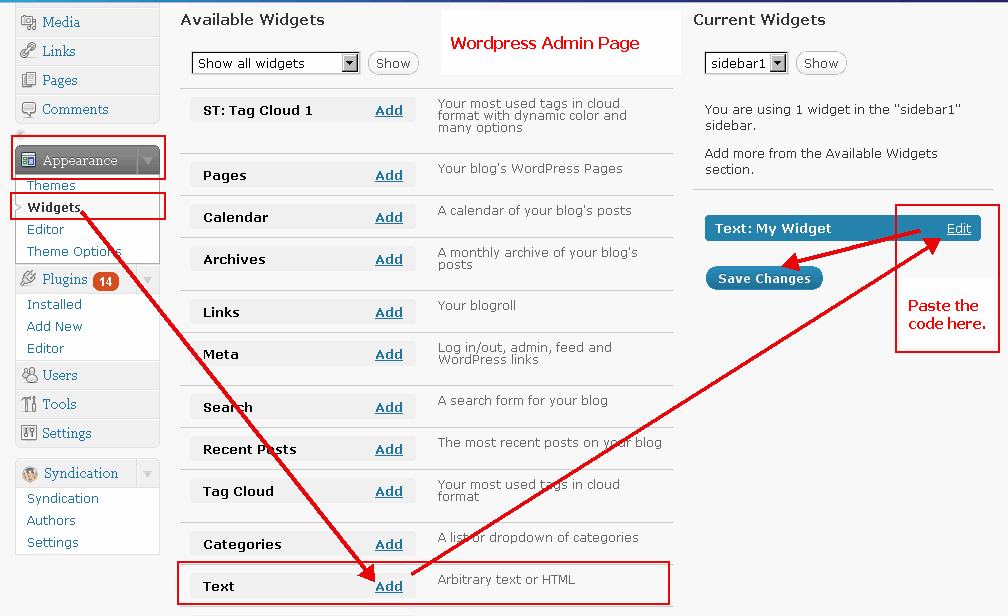
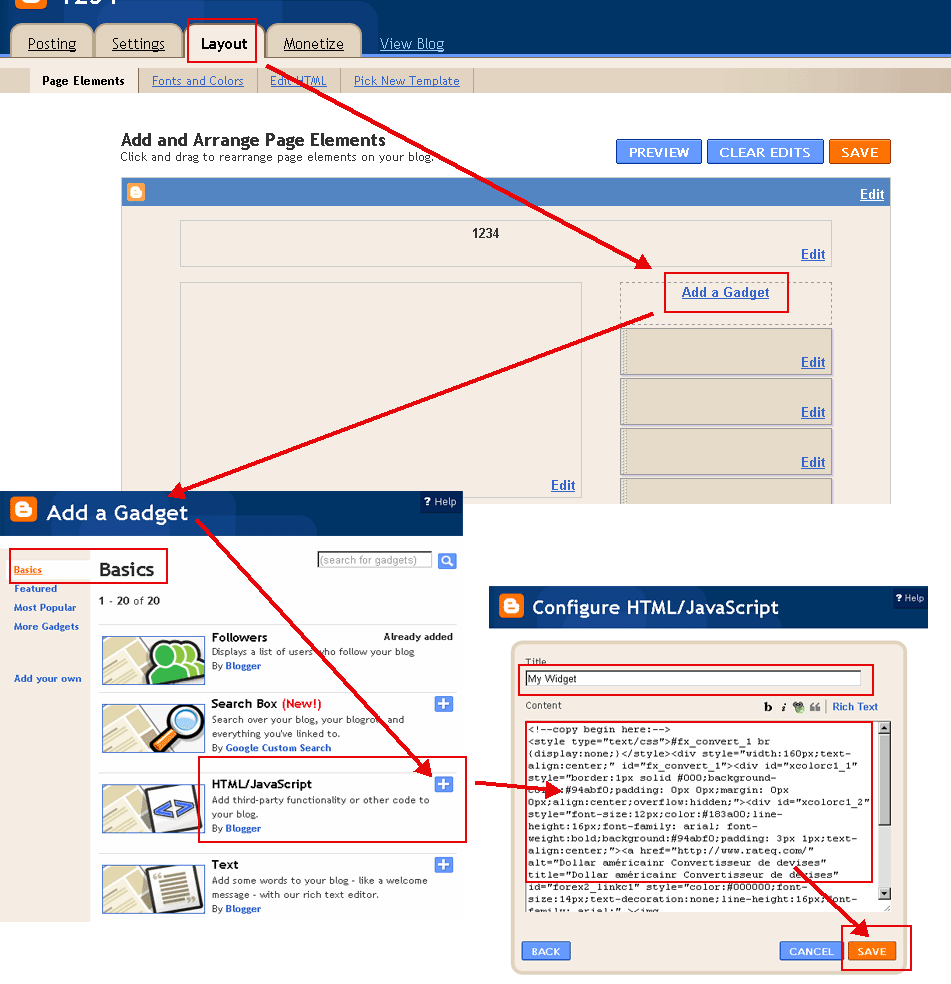
コピーボタンを押すとあなたのブログやウェブサイトに貼り付けます。
(以下のHTML 'モード'があなたのブログに投稿するスイッチ。例:
ワードプレスの例
,
Bloggerの例
)
色の選択(
?
):
フォントの色(
?
):
年月日:
5月 21日 2018 10:23:39 AM
21日 5月 2018 10:23:39 AM
5/21/2018 10:23:39 AM
21/5/2018 10:23:39 AM
2018/5/21 10:23:39 AM
2018-5-21 10:23:39 AM
5月 21日 2018 月 10:23:39 AM
21日 5月 2018 月 10:23:39 AM
5/21/2018 月 10:23:39 AM
21/5/2018 月 10:23:39 AM
2018/5/21 月 10:23:39 AM
2018-5-21 月 10:23:39 AM
2018年5月21日 月 10:23:39 AM
月, 5月 21日 2018 10:23:39 AM
月, 21日 5月 2018 10:23:39 AM
月 5月 21日 2018 10:23:39 AM
月 21日 5月 2018 10:23:39 AM
チューリッヒ 時間
クリップボードにコピー
<!--copy begin here:--> <style type="text/css">#fx_convert_1 br {display:none;}</style><div style="width:210px;text-align:center;" id="fx_time_1"><div id="xcolorc1_1" style="border:1px solid #000;background-color:#94abf0;padding: 0px 0px;margin: 0px 0px;align:center;overflow:hidden;"><div id="xcolorc1_2" style="font-size:12px;color:#183a00;line-height:16px;font-family: arial; font-weight:bold;background:#94abf0;padding: 3px 1px;text-align:center;"><a href="http://jp.timeq.org/Zurich" alt="チューリッヒ - Zurich 時間" title="チューリッヒ - Zurich 時間" id="xtime_link1" style="color:#111111;font-size:14px;text-decoration:none;line-height:16px;font-family: arial;" >チューリッヒ 時間</a></div><div id="clockjpZurich1" style="color:#111111;font-size: 1em;font-family: arial; font-weight:bold"></div><script src="http://jp.timeq.org/z.php?z=Europe/Berlin&id=clockjpZurich1&t=1"></script></div></div> <!--copy end here:-->
色の選択(
?
):
カレンダー
<<
>>
日
月
木
水
火
金
土
カレンダー|時間
クリップボードにコピー
<!--copy begin here:--> <style type="text/css">#mort_cal_1 br {display:none;} #calendar123 td.onToday{color:#ff0000;}</style><div style="width: 160px;text-align:center;"><div style="border:1px solid #000;background-color:#fefefe;color:#333333;padding: 0px 0px;margin: 0px 0px;align:center;text-align:center;overflow:hidden;"><div id="xcolorcs1_1" style="font-size:12px;color:#173a00;line-height:16px;font-family: arial; font-weight:bold;background:#94abf0;padding: 3px 1px;text-align:center;"><a href="http://jp.timeq.org/" alt="カレンダー|時間" title="カレンダー|時間" id="gooddaycal_link" style="color:#000000;font-size:14px;text-decoration:none;line-height:16px;font-family: arial;" ><img src="http://jp.timeq.org/day.gif" border="0" style="margin:0;padding:0;border:0;" />カレンダー</a> </div><DIV style="font-size:16px;"><DIV id=calendar123prev style="float:left;cursor:pointer;padding-left:5px;"><<</DIV><DIV id=calendar123next style="float:right;cursor:pointer;padding-right:5px;">>></DIV><SPAN id=calendar123year></SPAN> <SPAN id=calendar123month></SPAN> <TABLE cellSpacing=0 style="padding-left:12px;"><THEAD><TR><TD><font style='color:red;font-size:14px;'>日</font></TD><TD style='font-color:black;font-size:14px;'>月</TD><TD style='font-color:black;font-size:14px;'>木</TD><TD style='font-color:black;font-size:14px;'>水</TD style='font-color:black;font-size:14px;'><TD>火</TD><TD style='font-color:black;font-size:14px;'>金</TD><TD><font style='color:red;font-size:14px;'>土</font></TD></TR></THEAD><TBODY id=calendar123></TBODY></TABLE><INPUT id=calendar123prevyear type=button value='前年'><INPUT id=calendar123today type=button value='今月'><INPUT id=calendar123nextyear type=button value='次年'></DIV><script type="text/javascript" src="http://jp.timeq.org/z2.php"></script></div><a href="http://jp.timeq.org/" alt="カレンダー|時間" title="カレンダー|時間" id="gooddaycal_link2" style="font-size:12px;text-decoration:none;line-height:16px;font-family: arial;align:center;" >カレンダー|時間</a></div> <!--copy end here:-->
チューリッヒ - Zurich インフォメーション&ニュース:
 カレンダー
カレンダー